Participating in a Funding Round
The Octant voting app is where you help direct a shared matching pool to Ethereum public-goods projects. You choose the projects you want to support, decide how much of your voting budget to allocate to each one, and submit your ballot before the round ends.
The upcoming Epoch 12 will be the first full round to use the Octant v2 voting app and contracts.
This guide walks through the voting flow. To understand the matching calculation, see How Matching Works.
Choose a Participation Path
Funding-round operators decide which funding sources are available in each round. They can enable one source or both:
- Accrued Rewards: WETH you accrued by locking GLM or another supported community token in Octant. Your full contribution becomes voting power, with no swap or burn.
- Wallet WETH: ETH from your wallet, wrapped to WETH during signup. Half becomes voting power; the other half is swapped to the round's configured burn token and burned.
If a round allows only accrued rewards, users without accrued rewards cannot participate in that round. If a round allows both sources, you can choose only one source for that round. Once you choose a funding source, you cannot switch to the other source for that round.
Open a Funding Round
- Go to epoch.octant.app.
- Select Connect Wallet and approve the connection in your wallet.
- Choose a live round from Active Rounds.
The funding-rounds page also lists past rounds. Each round card shows its status and key information, including the number of projects, voter count, matching pool, and matching method.
Set Your Contribution
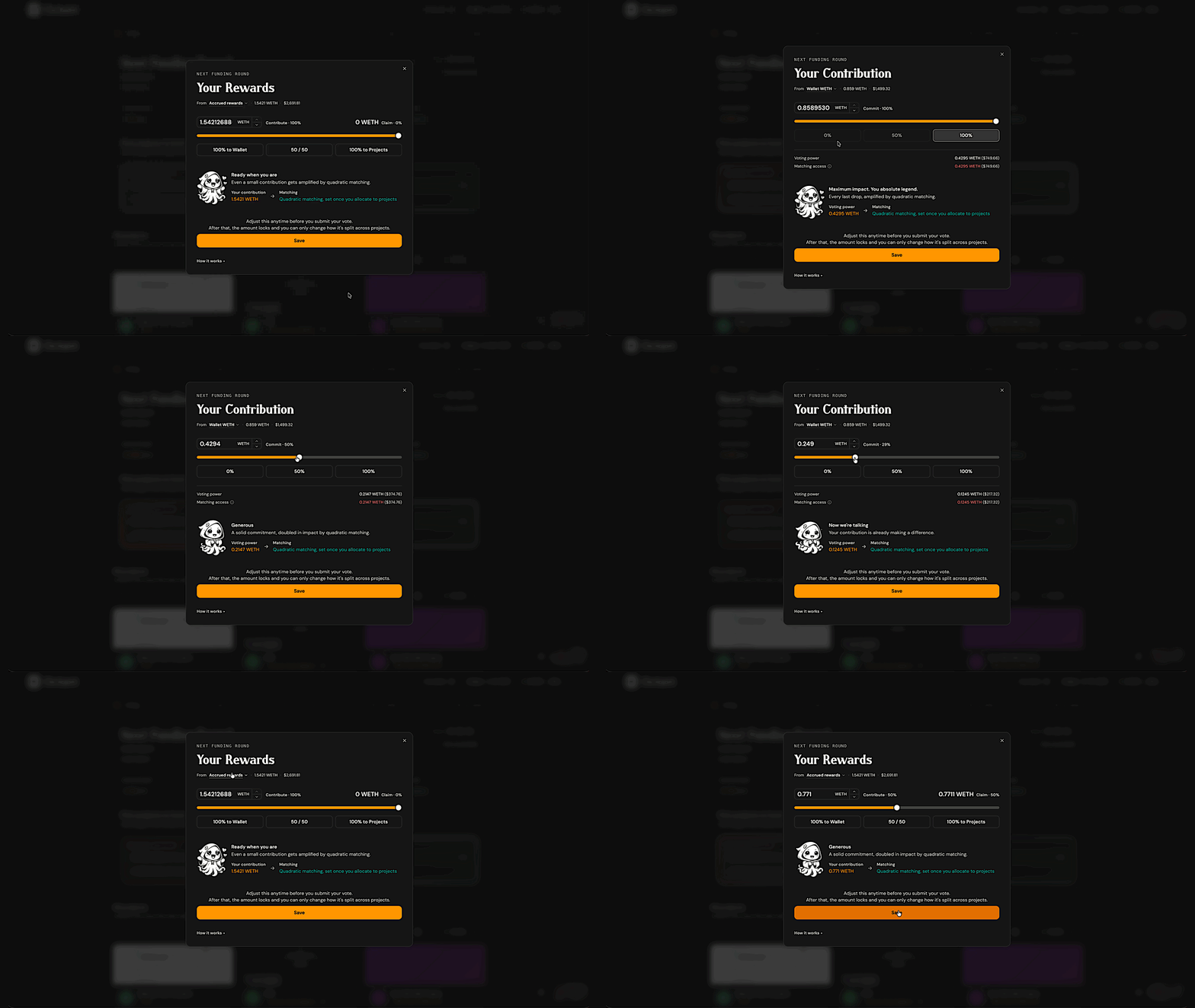
Before allocating funds, set Your Contribution. This is your voting deposit, or budget, for the round.
- Select an available funding source: Accrued Rewards or Wallet WETH.
- Enter the amount you want to commit. You can type an amount, use the slider, or select a percentage shortcut.
- Review the details shown by the app.
- Select Save.
You can set Your Contribution only once during a live round. The first time you vote, the app uses an on-chain transaction to set this budget. Once it is set, you cannot increase or decrease it until the round ends. You can still change how that budget is split across projects.
If you use Accrued Rewards, 100% of the amount you commit becomes voting power.
If you decide to keep some of your Accrued rewards, you can withdraw them to your wallet through the Octant locking app.
If you use Wallet WETH, the amount you commit is split in half:
- 50% becomes voting power.
- 50% is swapped to the round's configured burn token and burned.
For example, if you commit 0.1 WETH through the Wallet WETH path, you receive 0.05 WETH of voting power. The other 0.05 WETH is swapped to the burn token and burned.
The app enforces minimum and maximum commitment amounts for the Wallet WETH path. The exact limits appear when you set your contribution. Accrued-rewards commitments are not capped.
Explore the Round
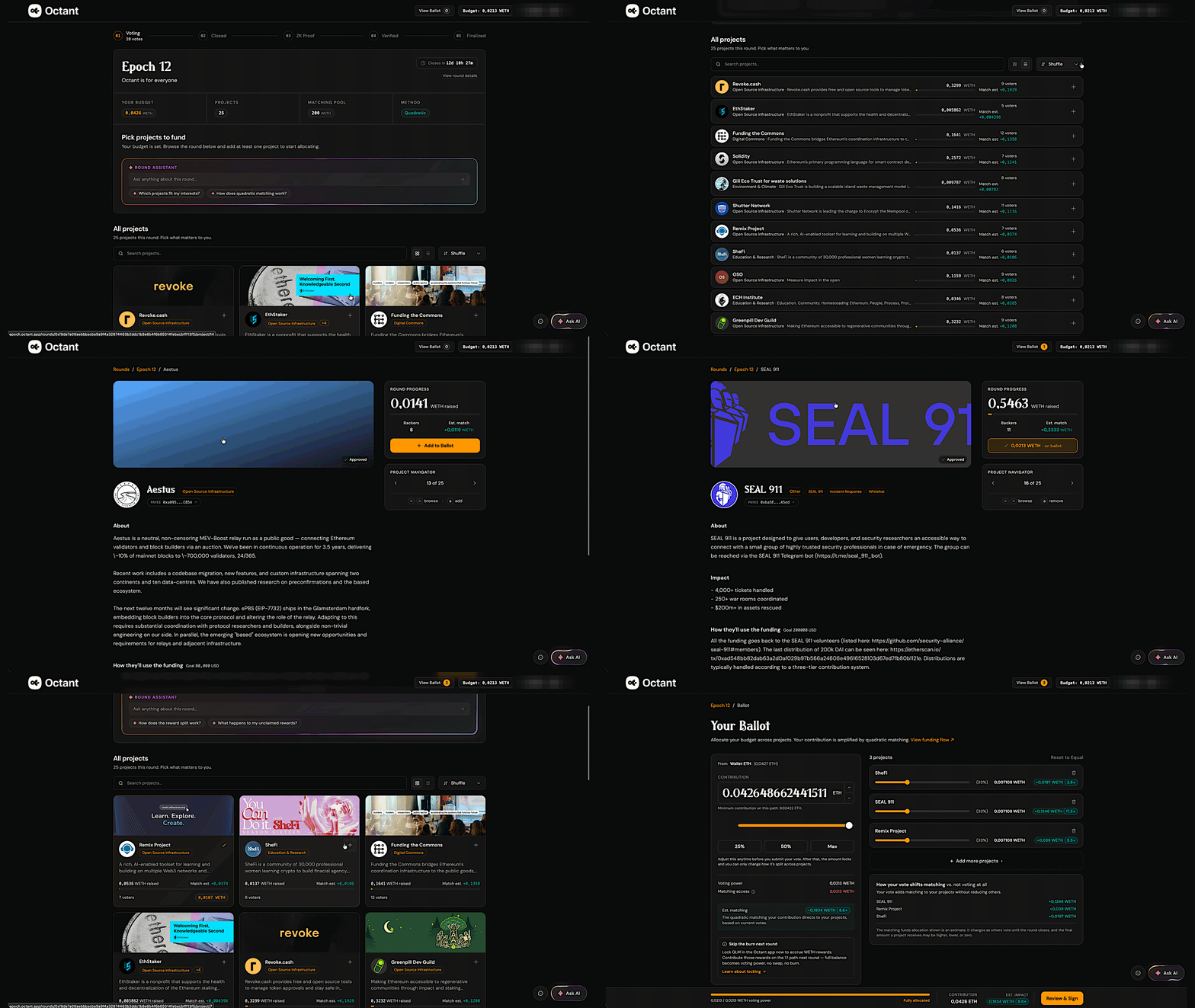
The round page shows the current stage and time remaining. Select Round details to view the round status, matching method, number of projects, voter count, prize pool, and round ID.
Use the projects area to build your ballot:
- Search for projects by name.
- Switch between grid and list views.
- Sort projects by Shuffle or Name.
- Open a project to read its description, goals, milestones, and links.
- Use the project navigator to move between project pages.
- Ask the round assistant for help while exploring projects.
Build Your Ballot
- Add a project by selecting the + icon on its card or Add to Ballot on its project page.
- Select View Ballot to review the projects you added.
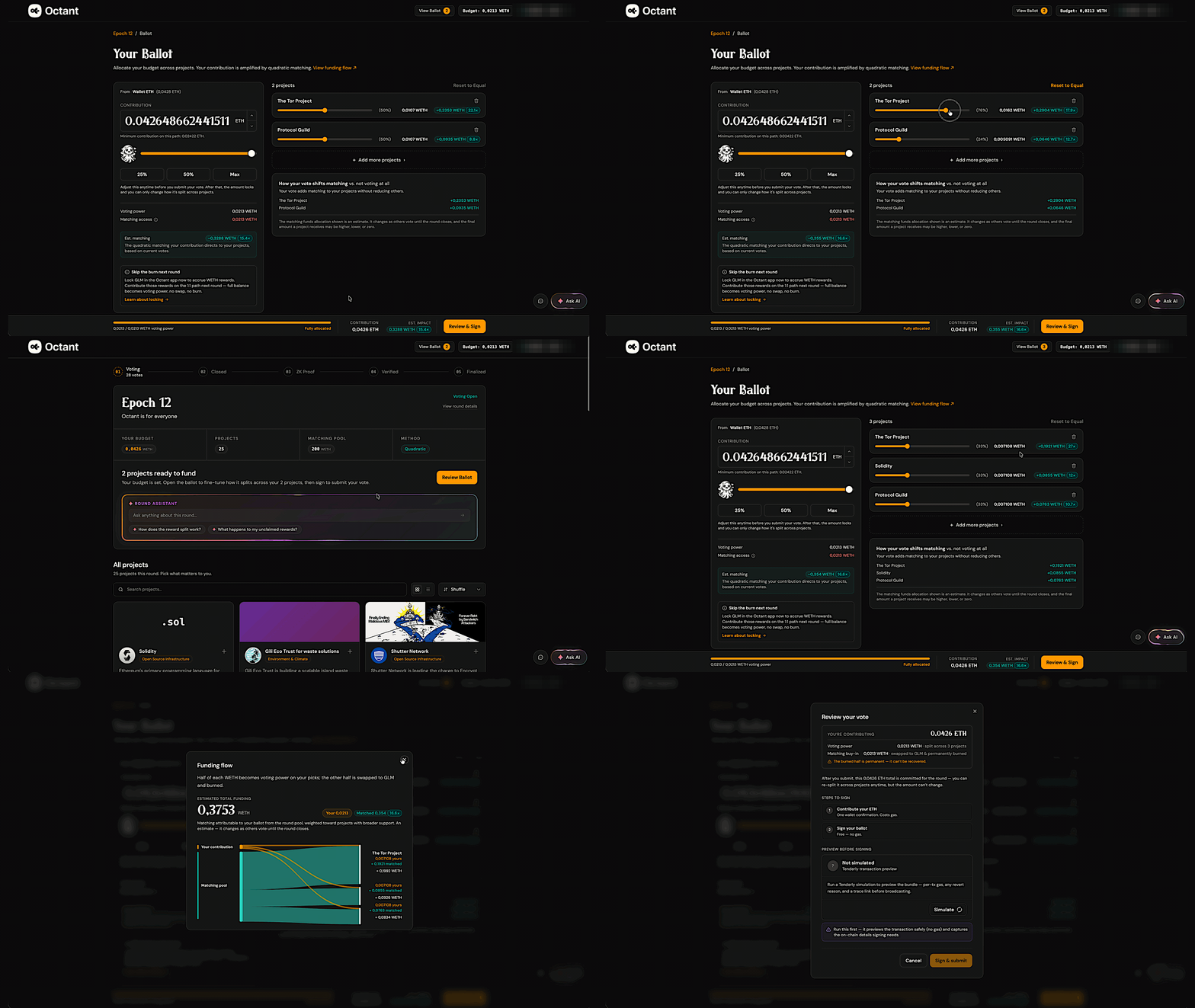
- Allocate your voting power across the selected projects.
You can adjust each project individually or use Split evenly across projects. On the full ballot page, select Reset to Equal to divide your voting power equally again.
You can also remove projects or select Add more projects to continue browsing. Before submitting, allocate your full voting-power budget across the projects on your ballot.
Matching is not guaranteed. The estimate shown in the app is a projection that depends on support from other voters and overall demand across the round; it can move up or down until the round closes. It may end higher than projected if your projects gain broader support, or lower than projected — even below the amount you burned — if demand across the round outpaces the pool. A project with no other supporters receives no matching.
Simulate and Submit Your Vote
When your ballot is ready:
- Select Review & Sign.
- Check the contribution summary and project allocations.
- Select Simulate.
- Approve the wallet signature requests needed for the simulation.
- Wait until the simulation reports Looks good.
- Select Sign & submit.
- Complete the wallet confirmations.
Simulation is required before the app can cast your vote successfully. If the review step shows Simulate, run it before selecting Sign & submit.
Signing up to vote requires a single on-chain transaction with minimal gas. After signup, voting and revoting are gasless. Each ballot is an EIP-712 signed message sent to Octant's sequencer.
Your wallet may still ask for multiple confirmations. Keep the app open until you see the confirmation page.
Update Your Ballot
You can update your ballot as often as you like while voting remains open:
- Return to the live round and select View Ballot.
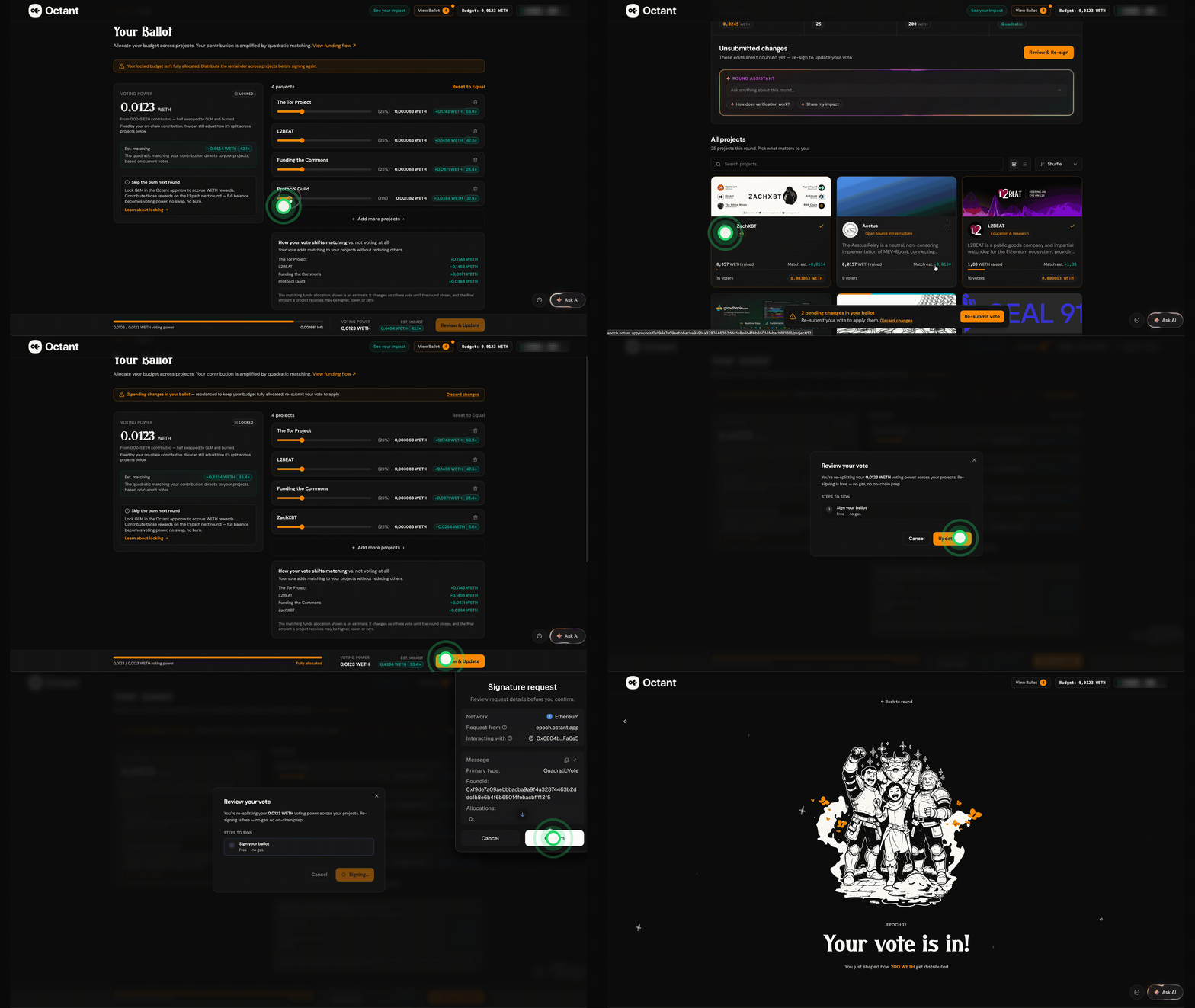
- Add or remove projects, or adjust the allocation sliders.
- Check that your voting power is fully allocated.
- Select Review & Update or Re-submit vote.
- Complete the wallet signature request to submit the updated ballot.
Your total contribution remains fixed. Updating a ballot changes only how your voting power is distributed between projects. Only your latest ballot counts in the final tally.
Review Your Impact
After submitting, the confirmation page shows the projects you supported and the amount allocated to each one. You can return to the round, share your participation, or select See your impact.
Select View funding flow to explore:
- How much of your contribution became voting power
- How much provided matching access through the token burn
- The estimated matched amount
- How additional voters and contributions could affect matching
Matching estimates can change while the round is live as more people participate.
Octant uses Proper Quadratic Funding (pQF), so the round's matching pool is an upper limit on what can be distributed — not an amount that is paid out in full. The portion actually used depends on how much quadratic demand the round generates, which comes from the number and breadth of contributors, not just the total amount contributed. Each additional person backing a project increases matching more than a single large contribution does; a project with only one supporter generates no matching at all.
When total demand is below the pool, every project receives its full quadratic match and the unused remainder reverts to the round creator. When demand exceeds the pool, all of it is distributed and each project's match is scaled down proportionally so the total fits. Either way, projects keep their direct contributions.
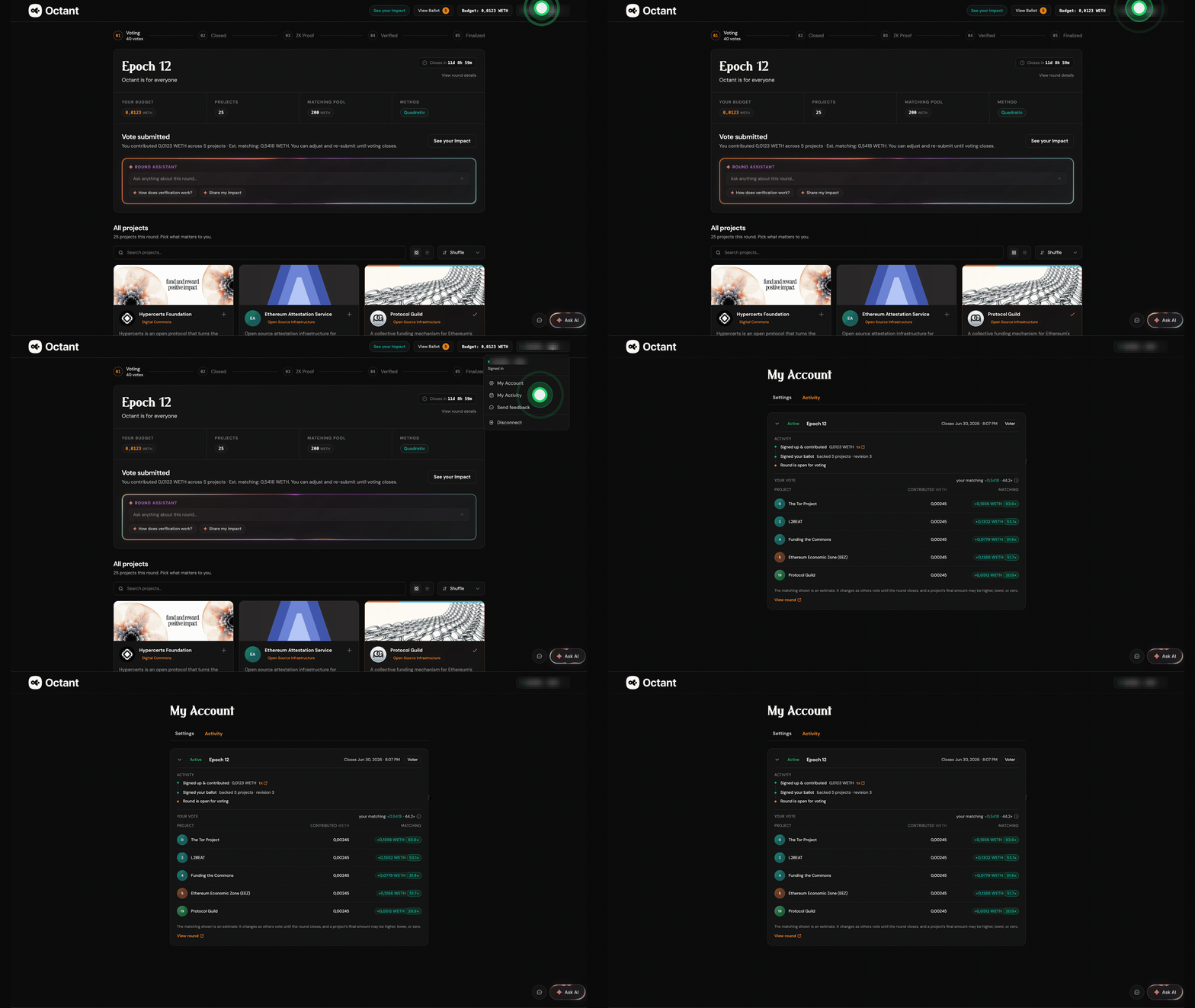
To review your activity in the Octant voting app, click your wallet address in the top-right corner and choose My activity from the dropdown menu.
What Happens After the Round Closes
After voting closes, the round moves through the results pipeline. Ballots are sequenced, the zero-knowledge proof is generated, the proof is verified on-chain, and the final allocation becomes ready for distribution.
In Epoch 12, votes are public. The zero-knowledge proof makes the tally trustworthy and inexpensive to verify, but it does not hide voter addresses or ballot choices.
Once the tally is verified, payment contracts for direct contributions and the matching pool are deployed on-chain. Each project's allocation becomes claimable after a short finalization delay. Any unused matching funds are recoverable by the round creator.
Contribute Accrued Rewards in Future Rounds
If you participate through Wallet WETH, you can also lock a supported community token in Octant to accrue WETH rewards for future rounds.
For Golem Foundation, locking at least 100 GLM at glm.octant.app lets you accrue WETH rewards funded by Golem Foundation's ETH staking rewards. In Octant v2, these rewards do not expire and can be applied to any compatible round.
When you contribute accrued rewards, your full committed amount becomes voting power. There is no swap or token burn.
See Getting Started with Octant v2 to learn more about locking tokens.
How Matching Works
Octant uses quadratic funding (QF) to allocate matching funds. QF rewards broad support over concentrated support: a project backed by many small contributors can receive more matching than a project backed by one large contributor, even if both projects raise the same direct amount.
In standard QF, a project's ideal total funding is:
(sum(sqrt(c_i)))^2
where c_i is each individual contribution.
In practice, the matching pool may not be large enough to give every project its ideal QF payout. Octant uses a capital-constrained version of QF, also called Proper QF (pQF), to scale matching fairly:
payout = sum(c_i) + alpha * ((sum(sqrt(c_i)))^2 - sum(c_i))
sum(c_i) is the project's direct contributions. The rest of the formula is the matching subsidy. alpha scales that subsidy to fit the available matching pool.
If the pool is large enough, alpha can be 1, and projects receive their ideal QF payout. If demand exceeds the pool, alpha drops below 1, so every project's matching subsidy is scaled fairly. Projects keep their direct contributions either way.
For the Wallet WETH path, you commit twice the voting power you want. Half becomes your voting deposit, and half is swapped to the configured burn token and burned. If your final matching multiplier is above 2x, this path gives your chosen projects more total funding than a direct contribution of the same amount.
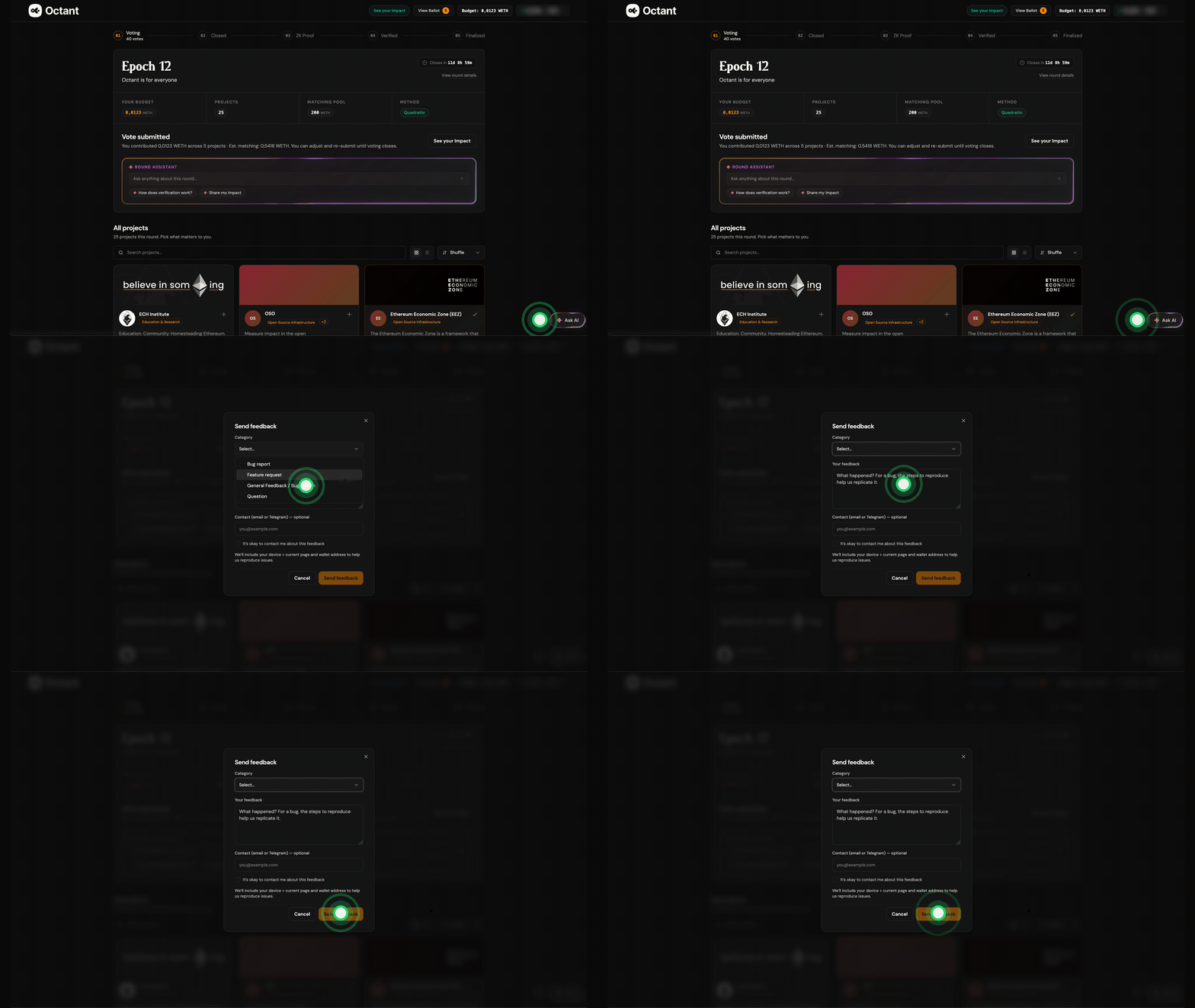
Send Us Your Feedback
To share feedback on the new voting experience in Octant v2, please use the in-app form.
You can access it through the chat icon next to the AI Assistant, or from the menu under your wallet address in the top-right corner.